
MtCaptchaTokenProxyLess
Solve an MTCaptcha widget without a proxy and get the verified token to submit with your form. Shows the request schema, an example and provider prices.
MtCaptchaTokenProxyLess solves an MTCaptcha widget from the provider network and returns the verified token to submit with your form. MTCaptcha is a text-and-audio CAPTCHA: the visitor reads distorted characters from an image and types them into an input under the widget. When a visitor passes the CAPTCHA, the widget creates that token, and the site's backend validates it with MTCaptcha (MTCaptcha quick start).
If the site validates the token against the address that submits it, use MtCaptchaToken with your proxy.
Find websiteKey
The sitekey is the sitekey value of the mtcaptchaConfig object the page defines before it loads the MTCaptcha script, as in the quick start. It starts with MTPublic-. Open the page source, or the Elements tab in DevTools, and search for mtcaptchaConfig or sitekey.
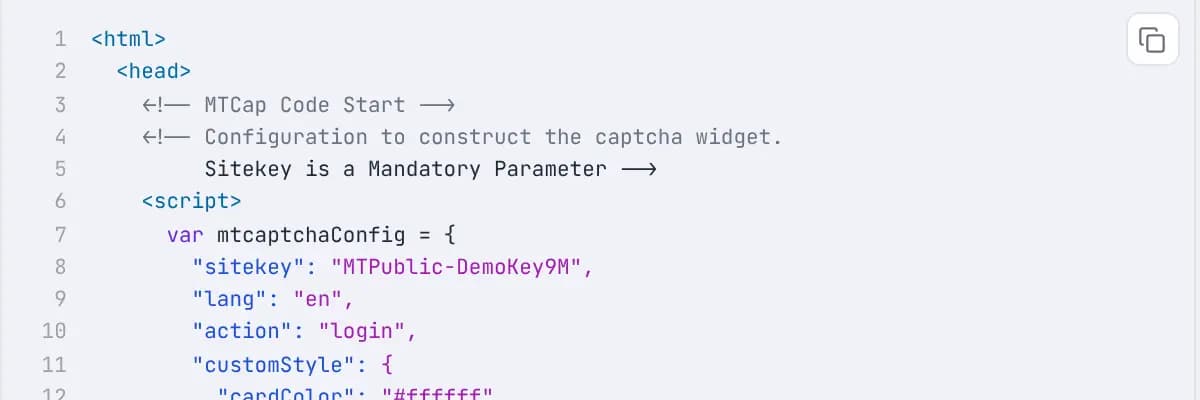
The screenshot is MTCaptcha's code builder, which shows the config a site embeds. The demo key MTPublic-DemoKey9M is the one used in the generated request example. Send the URL of the page that shows the widget as websiteURL. The provider does not need to open it as a logged-in user.
Optional parameters
Only CapMonster accepts these two fields: it sends them as pageAction and isInvisible of its MTCaptchaTask. Other providers ignore them.
pageAction: the value of theactionkey ofmtcaptchaConfig, if the config has one (the code builder above showslogin). MTCaptcha limits an action to 30 characters, and the site can read it back from thetokeninfo.actionfield when it validates the token (MTCaptcha action guide).isInvisible: set it totruewhen the site uses an invisible CAPTCHA, where MTCaptcha shows no visible challenge and still creates a verified token. MTCaptcha can run an extra verification on an invisible widget when it suspects a bot.
Use the token
The token has the form v1(...). Per MTCaptcha's token validation guide, the widget inserts the verified token into the form as a hidden input named mtcaptcha-verifiedtoken. The page script can also read it with mtcaptcha.getVerifiedToken(), or from status.verifiedToken in the verified callback. Submit your token as the mtcaptcha-verifiedtoken field of the form request. If the page sends the token in a different request parameter, submit the form once in a browser with the DevTools Network tab open and find the parameter that carries it.
The same guide sets two limits on a token. The site's server can check it once, unless the site raises tokenDuplicateCallMaxCount. Per the token validation guide, a token expires after 120 seconds unless the site extends it with tokenExpireMiniSec. Submit the token as soon as the task returns.
If the site rejects the token, check that websiteKey and websiteURL come from the page that shows the widget. MTCaptcha's validation response reports the client IP (tokeninfo.ip) and the hostname the CAPTCHA was served under, so a site can compare them with the request that submits the token.
Check Provider stats for live success rates and solve times before you pick a provider.
Supported Providers
| Provider | Price per 1,000 | Routing |
|---|---|---|
CapSolver | $3.00 | |
2Captcha | $1.45 | |
CapMonster | $1.50 | |
SolveCaptcha | $1.45 |



Request Schema
| Field | Type | Required | Description |
|---|---|---|---|
clientKey* | string | Yes | Your API key. Create one in a workspace of the AnySolver dashboard. Example: |
task* | object | Yes | The task body. Required fields depend on the task type. See Tasks for per-task schemas. View task properties |
settings | object | No | Per-request settings for routing, Auto Retry, Auto Fallback, proxy reuse, response statistics and detailed analytics. Each field overrides the API key's value. See Routing modes. View settings reference |
Task Object Properties
The task field accepts an object with the following properties:
| Field | Type | Required | Description |
|---|---|---|---|
type* | Yes | ||
websiteURL* | URL | Yes | Full URL of the page where the CAPTCHA is displayed. Example: |
websiteKey* | string | Yes | The MTCaptcha sitekey, starting with Example: |
pageAction | string | No | The action value from the widget configuration (the Example: |
isInvisible | boolean | No | Set true when the widget is invisible, meaning it has a hidden confirmation field. MTCaptcha may then run an extra verification if it suspects a bot. Only CapMonster accepts it. Example: |
{
    "clientKey": "YOUR_API_KEY",
    "task": {
        "type": "MtCaptchaTokenProxyLess",
        "websiteURL": "https://service.mtcaptcha.com/mtcv1/demo/index.html",
        "websiteKey": "MTPublic-DemoKey9M"
    }
}
Optional fields are not guaranteed across providers
Response Schema
| Field | Type | Required | Description |
|---|---|---|---|
status* | Yes | Task status: "processing", "ready", or "failed". Example: | |
errorId* | Yes |
Example: | |
taskId | string | No | Unique identifier returned when the task was created. Example: |
errorCode | No | Machine-readable error code. Example: | |
errorDescription | string | No | Human-readable error message with resolution hints. Example: |
cost | number | No | Actual cost charged for this task in USD. Example: |
taskType | No | The type of CAPTCHA task to solve. Example: | |
provider | No | Provider that handled this task. While processing, the provider currently solving it. Example: | |
solution | object | No |
Solution Object Properties
The solution field contains an object with the following properties:
| Field | Type | Required | Description |
|---|---|---|---|
token* | string | Yes | The solved CAPTCHA token to submit with your form. Example: |
raw* | Record<string, unknown> | Yes | Raw provider response data for advanced use cases. |