
Routing modes
How the Cheapest, Fastest, Most reliable and Priority routing modes pick a provider, how Auto Retry and Auto Fallback recover, and where to set them.
A routing mode decides which provider gets each task. Set it on the API key in the dashboard, or override it per request with settings.routing.mode on createTask. Your AnySolver balance pays every provider, so routing across providers needs no account with any of them.
| Mode | Value | Picks the provider by | Use it when |
|---|---|---|---|
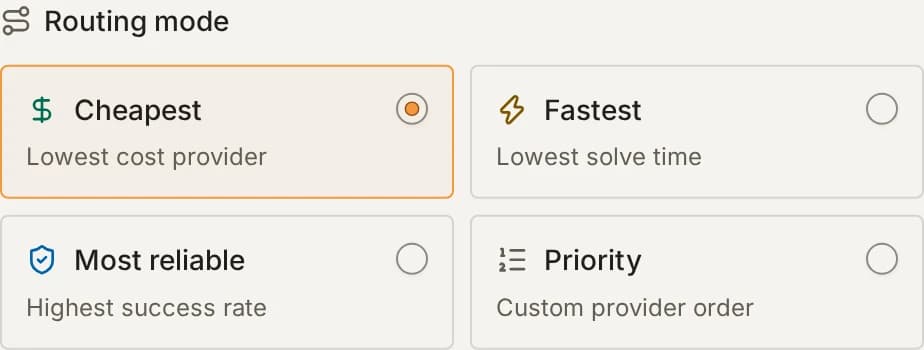
| Cheapest | autoCheapest | Lowest catalog price for the task type (the default) | Cost matters most |
| Fastest | autoFastest | Lowest p90 solve time in recent attempts | A user is waiting on the solve |
| Most reliable | autoMostReliable | Highest success rate in recent attempts, adjusted for count | A failed solve costs you more than the price |
| Priority | priority | Your own provider order, top to bottom | You have tested providers against your targets |
How routing picks a provider
For each task, AnySolver builds a candidate list: every provider that supports the task type, minus excluded providers, ranked by the routing mode. The task goes to the first candidate that is not paused and that no AnySolver routing rule blocks for the task's parameters (for example a website the provider does not accept). Auto Retry and Auto Fallback walk the rest of the same list when an attempt fails.
Ranking reads only the task type name and the providers' aggregated stats. All tasks of one type are ranked the same way, whatever their parameters. Ranking does not look at:
- the website domain or URL,
- the sitekey,
- per-website success history,
- provider-specific flags such as "least flagged for site X".
Only a routing rule can skip a provider for specific parameters. For site-aware selection, use Priority and curate the order per API key.
Cheapest
autoCheapest ranks providers by the catalog price of the task type, cheapest first. When two prices match, the order is fixed by AnySolver's provider list for that task type. It reads no stats, so it needs no warm-up and ranks a new provider from its first task.
Cheapest never reads solve times or success rates. A cheap provider that answers but fails more stays first in line. Each of its failed tasks still moves on through fallback, and you are charged once, at the price of the provider that solved it. To move traffic away from such a provider, switch the key to Most reliable or Fastest.
Fastest
autoFastest ranks providers by p90 solve time: the time that 9 in 10 solves finish within. It looks at the last 12 hours first, then 48 hours, then 30 days. Each provider is scored on the freshest of those windows that holds enough attempts, so a provider with little recent traffic still ranks on older data. A provider whose window has attempts but no successful solve ranks last among the scored providers, ahead of providers without such a window. How the stats are measured defines "enough attempts".
Most reliable
autoMostReliable ranks providers by success rate, over the last 48 hours first, then 30 days. It ranks on the lower bound of the rate's 95% confidence interval (the Wilson lower bound), not the raw rate. A provider needs a consistent record to win: 10 successes out of 10 ranks below 980 out of 1,000.
How the stats are measured
Fastest and Most reliable read routing stats that AnySolver recomputes every 15 minutes from every attempt, per provider and task type. When Auto Retry or Auto Fallback runs, each attempt counts for the provider that ran it, so a provider's failure stays in its stats even when another provider rescued the task.
Attempts are weighted per user: each user counts as the square root of their attempts, so one user with 100 attempts counts as 10. One account with a broken setup (a bad proxy, malformed requests) cannot sink or prove a provider by sending far more tasks than everyone else. A window ranks a provider once this weighted count reaches 10.
Providers without a window that reaches 10 follow the ranked ones, cheapest first. If no provider reaches 10, the order is the same as Cheapest. Provider stats shows the measured numbers; it shows a rate from fewer than 30 attempts as solved out of attempted and marks it as a low sample.
Priority
priority sends the task to the first provider in your order that supports the task type. The order comes from settings.routing.providerOrder on the request when you send it, otherwise from the priority order saved on the API key.
{
    "settings": {
        "routing": {
            "mode": "priority",
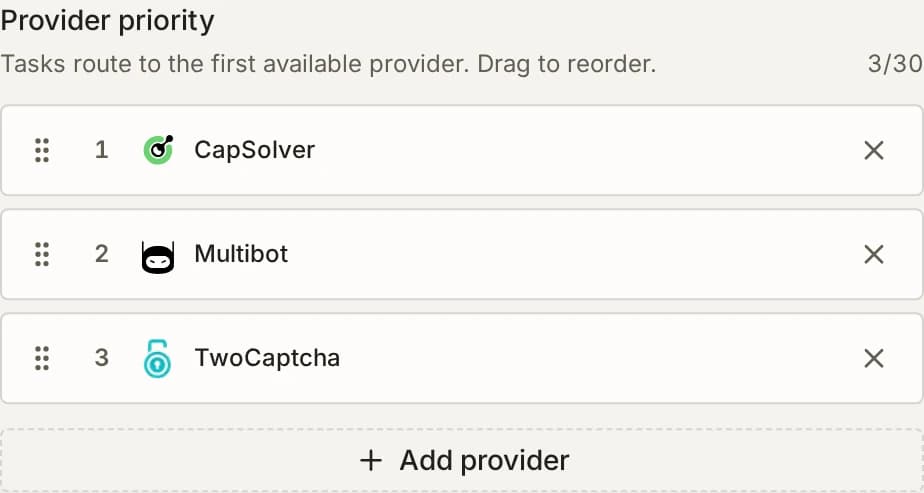
            "providerOrder": ["CapSolver", "Multibot", "TwoCaptcha"]
        }
    }
}
providerOrder takes provider IDs, which can differ from the brand name: TwoCaptcha is 2Captcha. Each provider page shows its ID. Providers in the order that do not support the task type are skipped.
providerOrder is accepted only with "mode": "priority", and priority needs an order from the request or the key. A request that breaks either rule fails with VALIDATION_ERROR before any charge.
Priority without Auto Fallback tries only the first supporting provider in your order. Turn on Auto Fallback to walk down the order when an attempt fails. New API keys have it on.
Set the routing mode
The mode is saved on the API key; any request can override it.
- Open the key's workspace from Workspaces, click API keys, then Edit on the key. The same fields are in the Create key dialog.
- Under Routing mode, pick Cheapest, Fastest, Most reliable or Priority.
- For Priority, drag providers into your order. Use Add provider to extend the list.
- Click Save changes. New tasks on that key follow the new mode at once.
To override the mode for one request, send settings.routing.mode on createTask. For example, a bulk job can run on Cheapest while interactive traffic on the same key stays on Most reliable:
{
    "settings": {
        "routing": { "mode": "autoCheapest" }
    }
}
Excluded providers
settings.routing.excludedProviders removes providers from the candidate list. An excluded provider is never used, not for the first attempt, a retry or a fallback. Set a default on the key under Advanced settings, Excluded providers; a request value replaces the key's list.
{
    "settings": {
        "routing": {
            "mode": "autoCheapest",
            "excludedProviders": ["CapSolver"]
        }
    }
}
A provider cannot be both in providerOrder and in excludedProviders, and excluding every provider that supports the task type is refused. Both fail with VALIDATION_ERROR before any charge.
Auto Retry and Auto Fallback
Auto Retry sends a failed attempt to the same provider again. Auto Fallback sends it to the next provider in the candidate list. Both run inside one task: you poll the same taskId and pay once. New API keys start with Auto Fallback on (maxFallbacks: 2) and Auto Retry off. Change them on the key under Auto retry and Auto fallback, or per request:
{
    "settings": {
        "routing": { "mode": "autoCheapest" },
        "retry": { "enabled": true, "maxRetries": 2 },
        "fallback": { "enabled": true, "maxFallbacks": 2 }
    }
}
A request field overrides only that field: "retry": { "maxRetries": 3 } keeps the key's other retry settings. Every field and its range is on createTask.
After an attempt fails, AnySolver retries first, then falls back, and stops when neither is allowed:
- Only an error that is refundable for the provider that ran the attempt continues the chain. An attempt that fails with any other code, such as
UNKNOWN_PROVIDER_ERRORon a provider that does not refund every failure, ends the task at once; How attempts are charged says what it costs. - A retry is allowed when Auto Retry is on, the provider has retries left (
maxRetries), and the code is in the retryonErrors. Errors caused by the request itself, such asINVALID_SITEKEY, are never retried on the same provider, because they fail the same way again. A proxy error is the one exception: it is retried while the task has a proxy no attempt has used yet.PROVIDER_PAUSEDandPROVIDER_IP_BLOCKEDare never retried either. - A fallback is allowed when Auto Fallback is on, fewer than
maxFallbacksfallbacks have run, another candidate is left, and the code is in the fallbackonErrors. A fallback starts the next provider's retry count from zero. Moves past your own provider keys follow their own rule and do not count againstmaxFallbacks. - When the chain stops, the task fails with the last attempt's error.
A later attempt can reach a provider that has been paused, or that a routing rule blocks for this task. AnySolver then records that attempt as failed with the provider's error and moves to the next candidate. It does this whether or not Auto Fallback is on, as long as Auto Retry or Auto Fallback is enabled on the task.
Every attempt resends the task as you submitted it. For a task that carries one-time values, such as a single-use token, turn off Auto Retry and Auto Fallback and create a new task with fresh values yourself.
Attempts resend the original task
Every retry and fallback sends the task exactly as you submitted it; only the proxy rotates. Values that are valid once (one-time tokens, short-lived session or challenge values) go stale for later attempts. For such tasks, turn off Auto Retry and Auto Fallback and create a new task with fresh values yourself.
Fallback follows the routing mode
Fallback has no order of its own. It walks the candidate list the routing mode produced:
| Mode | Next provider on fallback |
|---|---|
autoCheapest | The next cheapest |
autoFastest | The next fastest by p90 solve time |
autoMostReliable | The next highest by adjusted success rate |
priority | The next provider in providerOrder, or in the key's order |
A forced provider (settings.routing.provider) has no second candidate, so it cannot fall back. A request that sends it with "fallback": { "enabled": true } or with an auto* mode fails with VALIDATION_ERROR. When Auto Fallback comes from the key's settings, a forced provider turns it off for that request.
How attempts are charged
createTask deducts one estimate: the price of the first provider in the candidate list. Retries and fallbacks add no charge while they run. When the task ends, the charge is settled once:
| The task ends | You pay |
|---|---|
| Solved | The price of the provider that solved it |
| Failed with a refundable error | Nothing: the estimate is refunded in full |
| Failed with a non-refundable error | The price of the provider that ran the last attempt |
Still running 30 minutes after createTask | Nothing: it fails with TASK_TIMEOUT and is refunded |
A failed attempt on an earlier provider costs nothing. When the provider that solved the task costs more than the estimate, the difference is charged at settlement; when it costs less, the difference is refunded. Refunds explains which errors are refundable.
The 30-attempt budget
A task runs at most 30 attempts in total, across every retry and fallback. Each provider can use up to maxRetries + 1 of them before the chain moves on. A high retry budget can therefore starve the providers at the end of the order: with maxRetries: 10, each provider takes up to 11 attempts, so a fourth provider would start at attempt 34 and never runs.
Keep (maxRetries + 1) × maxFallbacks under 30 so every provider can be reached. The dashboard refuses to save a key whose retry and fallback settings cannot reach every provider, and offers fixes under Auto fallback.
How long one attempt can take
Each attempt has its own time limit, set by the provider that runs it:
- For a provider that AnySolver polls for the result, the limit is the provider's maximum number of polls times its poll interval, plus 60 seconds. Across providers this ranges from 2 to 21 minutes. An attempt still unsolved at its limit fails with
TASK_TIMEOUT, and Auto Retry and Auto Fallback act on it like any other attempt error. - For a provider that answers in one call, the limit is 10 minutes. An attempt still open at that limit ends the task with
TASK_TIMEOUT.
No attempt runs past 30 minutes from createTask, whatever its own limit.
Default errors and per-provider rules
When you omit onErrors, AnySolver uses a default set of faults that another attempt can clear. Fallback's default set is wider than retry's, because some faults (a provider at its global limit, a paused provider) clear only on another provider. Auto Retry and Auto Fallback in Error handling lists both sets.
settings.retry.providerRules sets maxRetries or onErrors for one provider. A rule overrides only the fields it defines and inherits the rest:
{
    "retry": {
        "enabled": true,
        "maxRetries": 1,
        "onErrors": ["TASK_TIMEOUT", "SERVICE_UNAVAILABLE"],
        "providerRules": { "CapSolver": { "maxRetries": 3 } }
    }
}
On a proxy task, each attempt uses the next proxy in task.proxy, and a task with a single proxy needs allowProxyReuse: true before retry or fallback can run. Rotation across attempts explains the rules.
Send settings.statistics: true and getTaskResult returns a retry object listing each attempt with its provider, error and duration, also while the task is still processing.
When a provider degrades
Three mechanisms react to a provider that stops working well, at different speeds:
| What happens to the provider | What reacts | When |
|---|---|---|
| One attempt fails with a fallback error | Auto Fallback moves that task to the next candidate | On that attempt |
| Its API stops answering | Health checks pause it for every account and every routing mode | After 15 seconds of failing checks |
| It still answers but solves slower or fails more | Fastest and Most reliable rank it lower as those attempts enter its stats; Cheapest and Priority keep the order | At each stats recompute, every 15 minutes |
Key pool mode
keyPoolMode decides which of AnySolver's provider API keys your tasks can run on. It never affects your own provider keys, which settings.routing.byok controls:
| Value | Tasks run on |
|---|---|
all (default) | Every available key, including keys contributed through Provider Exchange |
platformOnly | AnySolver's platform keys only |
all draws from the larger pool of keys. Use platformOnly when every task must stay on platform-owned keys, for privacy-sensitive workloads. Set the default on the key under Advanced settings, Key pool, or per request with settings.routing.keyPoolMode. Privacy and platform-only routing explains what changes.
Related
Quickstart
Solve your first CAPTCHA with AnySolver: create an account and an API key, send createTask, poll getTaskResult, then handle errors and rate limits.
Proxy configuration
How to pass your proxy to a proxy task type, which formats are accepted, and how proxies rotate across Auto Retry and Auto Fallback attempts.